Take control of your
laptop's battery
Free, open-source battery health checker for Windows. Get detailed insights about your battery's health, capacity, cycles, and performance — all with one click.

Everything you need to manage your battery
A powerful yet lightweight tool that gives you complete visibility into your battery's condition. Built with privacy in mind — no data collection, no sign-up, no nonsense.
Comprehensive Reports
Get detailed information about design capacity, current capacity, charge cycles, and overall health status with easy-to-understand metrics.
Smart Alerts
Set custom low and high battery thresholds. Get notified when your battery needs charging or when it's time to unplug for optimal longevity.
System Tray
Minimize to system tray and monitor your battery in the background. Auto-start with Windows so you're always protected.
Multi-language
Supports Arabic, English, and Spanish. Use Battery Health Checker in your preferred language.
Auto-updates
Built-in update checker notifies you when a new version is available. Stay up-to-date with the latest features and improvements.
Instant Analysis
Check your battery health with just one click. No complex setup or configuration required — results appear in seconds.
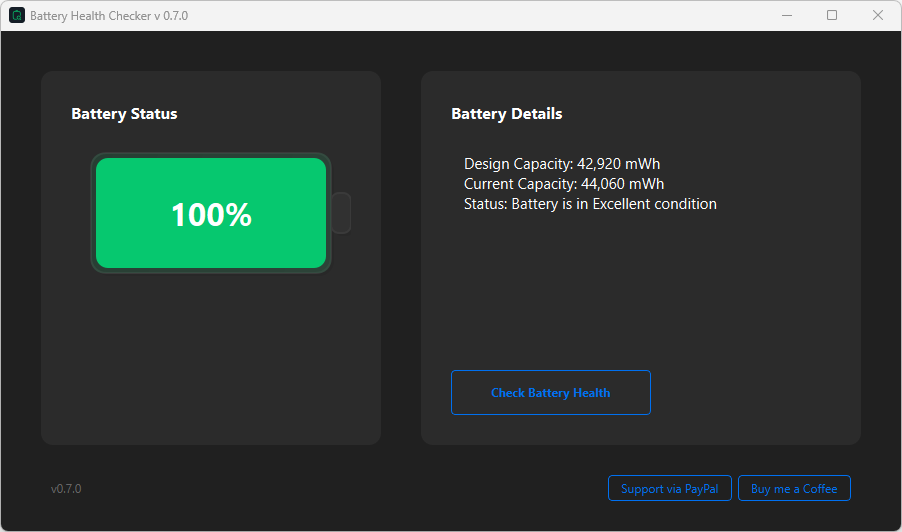
Your battery health.
One place.
Track all your battery vitals in a single, beautifully designed dashboard — health percentage, capacity metrics, charge cycles, manufacturer details, and real-time status.
Three steps to get started
Getting started with Battery Health Checker is simple and takes less than a minute.
Download the app
Choose the setup installer or portable version for Windows, or get it from Google Play for Android.
Install & launch
Run the installer or extract the portable archive. The app opens instantly with zero configuration needed.
Check your battery
View your battery health, capacity, cycle count, and set up smart alerts to protect your battery life.
Get Battery Health Checker
Choose the version that works best for you. All versions are free and open-source.
Windows Setup
Full installer with auto-updates and Start Menu shortcuts. Best for most users.
Download SetupWindows Portable
No installation required. Extract and run anywhere — perfect for USB drives and restricted systems.
Download PortableAndroid App
Battery Health Checker for your Android phone and tablet. Available on Google Play Store.
Google Play StoreWhy Battery Health Checker?
Built with transparency and user privacy as core principles.
100% Free
No subscriptions, no hidden fees, no premium tiers. Completely free forever.
Open Source
Full source code on GitHub. Verify, contribute, or fork — total transparency.
Privacy First
No data collection, no telemetry, no accounts. Your battery data stays on your device.
Lightweight
Minimal resource usage. Runs quietly in the background without slowing down your system.
Frequently Asked Questions
Everything you need to know about Battery Health Checker.
What is Battery Health Checker?
Battery Health Checker is a free and open-source tool for Windows and Android that helps you monitor and analyze your device's battery health. It provides detailed information about battery wear, capacity, charging cycles, and lets you set smart alerts to protect your battery life.
How accurate are the battery measurements?
The measurements are based on Windows' native battery report (powercfg /batteryreport), which provides direct access to your battery's hardware information. The tool uses the same data sources that Windows itself uses to report battery status, ensuring high accuracy.
Is Battery Health Checker safe to use?
Yes, completely safe. It only reads battery information and doesn't modify any system settings. The tool is open-source, so you can verify the code yourself on GitHub. We also provide SHA-256 checksums for each release to verify software integrity.
What are Smart Alerts?
Smart Alerts is a v1.0.0 feature that lets you set custom battery thresholds. You'll receive a notification when your battery drops below your low threshold (e.g., 20%) or exceeds your high threshold (e.g., 80%). Keeping your battery between 20-80% helps extend its lifespan.
Does it work on all Windows laptops?
Battery Health Checker works on most Windows laptops that support WMI battery information. This includes the vast majority of modern laptops running Windows 10 and 11. Some older devices or those with custom battery management systems might have limited functionality.
What's the difference between Setup and Portable versions?
The Setup version installs the app to your system with Start Menu shortcuts and auto-update support — recommended for most users. The Portable version requires no installation; just extract the ZIP and run it. It's ideal for USB drives or systems where you can't install software.